Originally shared by Han Held
I thought I had posted this already, but I couldn't find it when I looked. Apologies if this is a repost, this time at least it's in the right category.
Neat advanced prim manipulation tricks. :)
http://ayumicassini.blogspot.com/2009/07/ultimate-guide-to-prim-twisting.html
Friday, January 29, 2016
Hello dear members, it took me longer to set my Arcana Micro Grid and the project Hypergrid Welcome Center on one of...
Originally shared by Isis Ophelia
Hello dear members, it took me longer to set my Arcana Micro Grid and the project Hypergrid Welcome Center on one of the regions. I do have Diva standalone running in my computer, but I rented a simulator with 3 regions to leave to the provider the responsability to keep my mini-grid 24/7 hours online to set the project for Hypergrid Newcomers and to continue with my Live Music Events. If you'd like to see what I have done the last 3 weeks visit: arcana.hopto.org:9021
Since yesterday back to write the Diva USB Tutorials for you. Please take a look and give me your feedback, if the pictures are good to see, if you can follow my explanations etc. Still working on it. I will post in here, when you can download Diva USB and follow the Tutorials :)
The first part is here:
https://isisophelia.wordpress.com/diva-distro-usb/
And Part II is here
https://isisophelia.wordpress.com/diva-distro-usb/diva-usb-from-scratch/
https://isisophelia.wordpress.com/diva-distro-usb
Hello dear members, it took me longer to set my Arcana Micro Grid and the project Hypergrid Welcome Center on one of the regions. I do have Diva standalone running in my computer, but I rented a simulator with 3 regions to leave to the provider the responsability to keep my mini-grid 24/7 hours online to set the project for Hypergrid Newcomers and to continue with my Live Music Events. If you'd like to see what I have done the last 3 weeks visit: arcana.hopto.org:9021
Since yesterday back to write the Diva USB Tutorials for you. Please take a look and give me your feedback, if the pictures are good to see, if you can follow my explanations etc. Still working on it. I will post in here, when you can download Diva USB and follow the Tutorials :)
The first part is here:
https://isisophelia.wordpress.com/diva-distro-usb/
And Part II is here
https://isisophelia.wordpress.com/diva-distro-usb/diva-usb-from-scratch/
https://isisophelia.wordpress.com/diva-distro-usb
The Art from David Bowie’s Final Album, Blackstar, is Now Free for Fans to Download & Reuse
Originally shared by Open Culture
The Art from David Bowie’s Final Album, Blackstar, is Now Free for Fans to Download & Reuse
http://goo.gl/8sGLGe
The Art from David Bowie’s Final Album, Blackstar, is Now Free for Fans to Download & Reuse
http://goo.gl/8sGLGe
Linux only - looks impressive.
Linux only - looks impressive.
http://qtractor.sourceforge.net/qtractor-index.html
http://qtractor.sourceforge.net/qtractor-index.html
Thursday, January 28, 2016
The video sold me on this.
The video sold me on this. Much smaller than the old shuttle, but it sits inside a launch cover on the way up, so less chance of bits of the hull coming off. Also, looks like the cargo section fits snuggley into the ISS
http://motherboard.vice.com/read/europe-wants-a-dream-chaser-the-new-reusable-spaceplane
http://motherboard.vice.com/read/europe-wants-a-dream-chaser-the-new-reusable-spaceplane
Wednesday, January 27, 2016
Amusement at the past often relies on selective amnesia.
Amusement at the past often relies on selective amnesia.
http://mashable.com/2013/06/19/vintage-tech-ads/#859h3fl7zmqX
http://mashable.com/2013/06/19/vintage-tech-ads/#859h3fl7zmqX
Can see trouble brewing with this.
Can see trouble brewing with this.
https://www.minds.com/blog/view/538487741193658368
https://www.minds.com/blog/view/538487741193658368
Saturday, January 23, 2016
Friday, January 22, 2016
Wednesday, January 20, 2016
Hair! Trickiest to make.
Hair! Trickiest to make.
Originally shared by Serene Jewell
Everything I know about mesh hair...
Making mesh hair for virtual worlds is hard. If it were easy, there would be more nice inexpensive rigged mesh hair. My first Blender project was hair and I wish I had started with a table instead. :-)
If you rendered every strand of hair on a head, it would be far too high poly and you would lag every region you visit. Therefore the Blender hair particle system is a bad idea (for now.)
Instead, we need to think of hair in terms of clumps, not strands. This vimeo video gives a good idea of how to think of clumps of hair. https://vimeo.com/15274535 And a similar one from Masterxeon: https://www.youtube.com/watch?v=UqUXaISODkA (though I would texture that strand before duplicating it!) Here’s another video that I originally posted for +Tyra Balan. It shows how one designer uses even bigger clumps of hair. This is more like the Truth hair you would find in SL. https://www.youtube.com/watch?v=JAsslleGjJY
The general process here is:
--Create a plane, smooth, make it into a long leaf shape.
--Unwrap it, and texture it
--Shift D to copy it and begin placing leafs around the head
--Repeat until shapes are right
--Join it all.
--If the hair is long, you may need to rig it.
--Export and upload.
If you want to add moving wispy bits, you can add flexiprims inworld. I’m seeing more of that in SL these days.
The Blender skills needed are:
--Creating planes
--Get a model (Avastar, Make Human or other)
--Manipulate vertices
--Use proportional editing a lot
--Patience.
Honestly, I can’t believe there isn’t a better method by now. I keep thinking that any someone will come along with an easy low poly mesh hair maker. If you see one, let me know!
https://vimeo.com/15274535
Originally shared by Serene Jewell
Everything I know about mesh hair...
Making mesh hair for virtual worlds is hard. If it were easy, there would be more nice inexpensive rigged mesh hair. My first Blender project was hair and I wish I had started with a table instead. :-)
If you rendered every strand of hair on a head, it would be far too high poly and you would lag every region you visit. Therefore the Blender hair particle system is a bad idea (for now.)
Instead, we need to think of hair in terms of clumps, not strands. This vimeo video gives a good idea of how to think of clumps of hair. https://vimeo.com/15274535 And a similar one from Masterxeon: https://www.youtube.com/watch?v=UqUXaISODkA (though I would texture that strand before duplicating it!) Here’s another video that I originally posted for +Tyra Balan. It shows how one designer uses even bigger clumps of hair. This is more like the Truth hair you would find in SL. https://www.youtube.com/watch?v=JAsslleGjJY
The general process here is:
--Create a plane, smooth, make it into a long leaf shape.
--Unwrap it, and texture it
--Shift D to copy it and begin placing leafs around the head
--Repeat until shapes are right
--Join it all.
--If the hair is long, you may need to rig it.
--Export and upload.
If you want to add moving wispy bits, you can add flexiprims inworld. I’m seeing more of that in SL these days.
The Blender skills needed are:
--Creating planes
--Get a model (Avastar, Make Human or other)
--Manipulate vertices
--Use proportional editing a lot
--Patience.
Honestly, I can’t believe there isn’t a better method by now. I keep thinking that any someone will come along with an easy low poly mesh hair maker. If you see one, let me know!
https://vimeo.com/15274535
Thursday, January 14, 2016
Thursday, January 7, 2016
"Right now, a bunch of super tough robots are out there exploring our solar system.
"Right now, a bunch of super tough robots are out there exploring our solar system. You can build paper versions of many of them right here on Earth.
Paper modeling -- or card modeling -- is the art of constructing things with only colored, cut and folded pieces of paper. To help in constructing each model, you will need the free Adobe Reader to print the instructions and model parts. A link to adobe.com is provided with each model."
http://solarsystem.nasa.gov/kids/index.cfm?Filename=papermodels
Paper modeling -- or card modeling -- is the art of constructing things with only colored, cut and folded pieces of paper. To help in constructing each model, you will need the free Adobe Reader to print the instructions and model parts. A link to adobe.com is provided with each model."
http://solarsystem.nasa.gov/kids/index.cfm?Filename=papermodels
Probably NOT "dog fights in space".
Probably NOT "dog fights in space".
http://gizmodo.com/5426453/the-physics-of-space-battles
http://gizmodo.com/5426453/the-physics-of-space-battles
Wednesday, January 6, 2016
Stoners cross-fandom image.
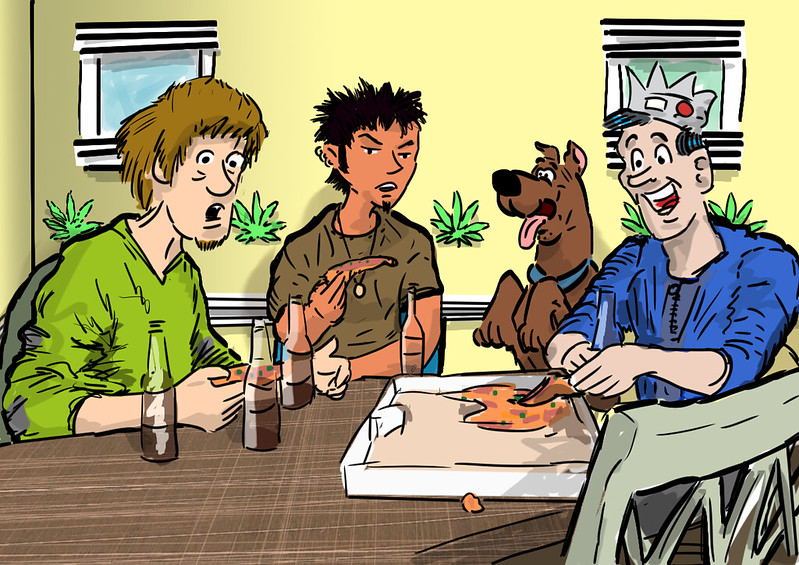
Jughead gets the last piece by Laura Seabrook, on Flickr
I've been meaning to draw this fan art for a while. It may need a little more finishing. Give you two guesses why Shaggy and Jughead are always hungry.
And you thought there was only ONE way (probably the Two Loop Shoelace Knot)!!!!
And you thought there was only ONE way (probably the Two Loop Shoelace Knot)!!!!
Originally shared by Ed S
Today, for the second time, I adopted a new way to tie my laces. A couple of years ago I'd moved up to "Better Bow" which is very secure but can still be undone by pulling the ends, and today I used "Ian's Fast" which is very fast to tie but a conventional knot. I had to redo it after a few minutes walking - evidently it needs to be pulled pretty tight. I might yet move back to Better Bow. Exciting times! Surely this is better than a photo of food?
http://www.fieggen.com/shoelace/knots.htm
Originally shared by Ed S
Today, for the second time, I adopted a new way to tie my laces. A couple of years ago I'd moved up to "Better Bow" which is very secure but can still be undone by pulling the ends, and today I used "Ian's Fast" which is very fast to tie but a conventional knot. I had to redo it after a few minutes walking - evidently it needs to be pulled pretty tight. I might yet move back to Better Bow. Exciting times! Surely this is better than a photo of food?
http://www.fieggen.com/shoelace/knots.htm
Tuesday, January 5, 2016
It looks like something the 2nd Doctor would have destroyed by logic loops. ;)

It looks like something the 2nd Doctor would have destroyed by logic loops. ;)
Originally shared by Yves Bolognini
As suggested by Ed S, a couple links about ERMETH, the first Swiss computer
http://www.ethistory.ethz.ch/rueckblicke/departemente/dinfk/forschung/weitere_seiten/ermeth/index_EN/popupfriendly/
http://www.computer.org/csdl/mags/an/2005/04/man2005040005-abs.html
https://de.wikipedia.org/wiki/ERMETH (German)
Sunday, January 3, 2016
"enGrid is an open-source mesh generation software with CFD applications in mind.
"enGrid is an open-source mesh generation software with CFD applications in mind. enGrid uses an in-house development for surface meshing and prismatic boundary layers; a module for hex far-fields will be added in the next release. Tetrahedral parts of the mesh are created by calling the Netgen library. Internally, enGrid uses the VTK data structures as well as the *.vtu file format."
Walks off in a daze...
http://engits.eu/en/engrid
Walks off in a daze...
http://engits.eu/en/engrid
Friday, January 1, 2016
Questions for the New Year: Plant Sculpt vs Plant Mesh

Originally shared by Lelani Carver
Questions for the New Year: Plant Sculpt vs Plant Mesh
Is there a better way to do this? Chic Aeon said I could ask, it's all her fault. ;) I'm a serial n00b with Blender; I keep coming back to it in fits and starts.
Rather than have a bunch of plant sculpts on my "castaway island" standalone (which are all sourced from a Linda Kellie OAR), I made a mesh object with 3 crossed planes in Blender. They both look about the same (but neither is all that great, they're obviously 2D masquerading as 3D). I have alpha blend set.
Is the mesh object always the way to go? Probably, although I'm not certain my "3 crossed planes" hack is the right way to do a plant this way. At least LI=1.
I struggled to get the mesh object to take the texture; in the end I think I created one plane, unwrapped that and textured it, then added the duplicate angled planes without unwrapping them while the original one was still selected. I messed around with a "star" object with flat vanes, but couldn't figure out how to get it to take the textures.
They look identical, anyway. I'll keep the mesh and ditch the sculpts.